

We've all been there. You're scrolling TikTok and find a hidden café in Paris with the perfect croissant, or a stunning waterfall in Bali pops up on your Instagram feed. You hit 'save,' filled with inspiration for your dream trip. And then… nothing. It vanishes into a digital abyss, a forgotten folder of good intentions.
This is the classic headache for modern travelers: how do you turn those scattered, exciting discoveries into a real, practical travel plan? The old ways—messy spreadsheets, a million browser tabs, and random notes on your phone—just don't work anymore. They can't keep up.
This shared frustration is exactly why a new generation of smart travel tools has emerged. The right app to plan a travel itinerary is built to solve this exact problem, acting as the one central place for all your brilliant ideas.
From Social Saves to a Real-Life Schedule
The best apps today are designed to do more than just list places. They’re built to capture, organize, and intelligently schedule everything you find.
Take Dream Trip, for instance. It hooks directly into your social media apps. Instead of screenshotting a post and forgetting where it was, you can send it straight from Instagram or a pin from Google Maps directly to your trip.
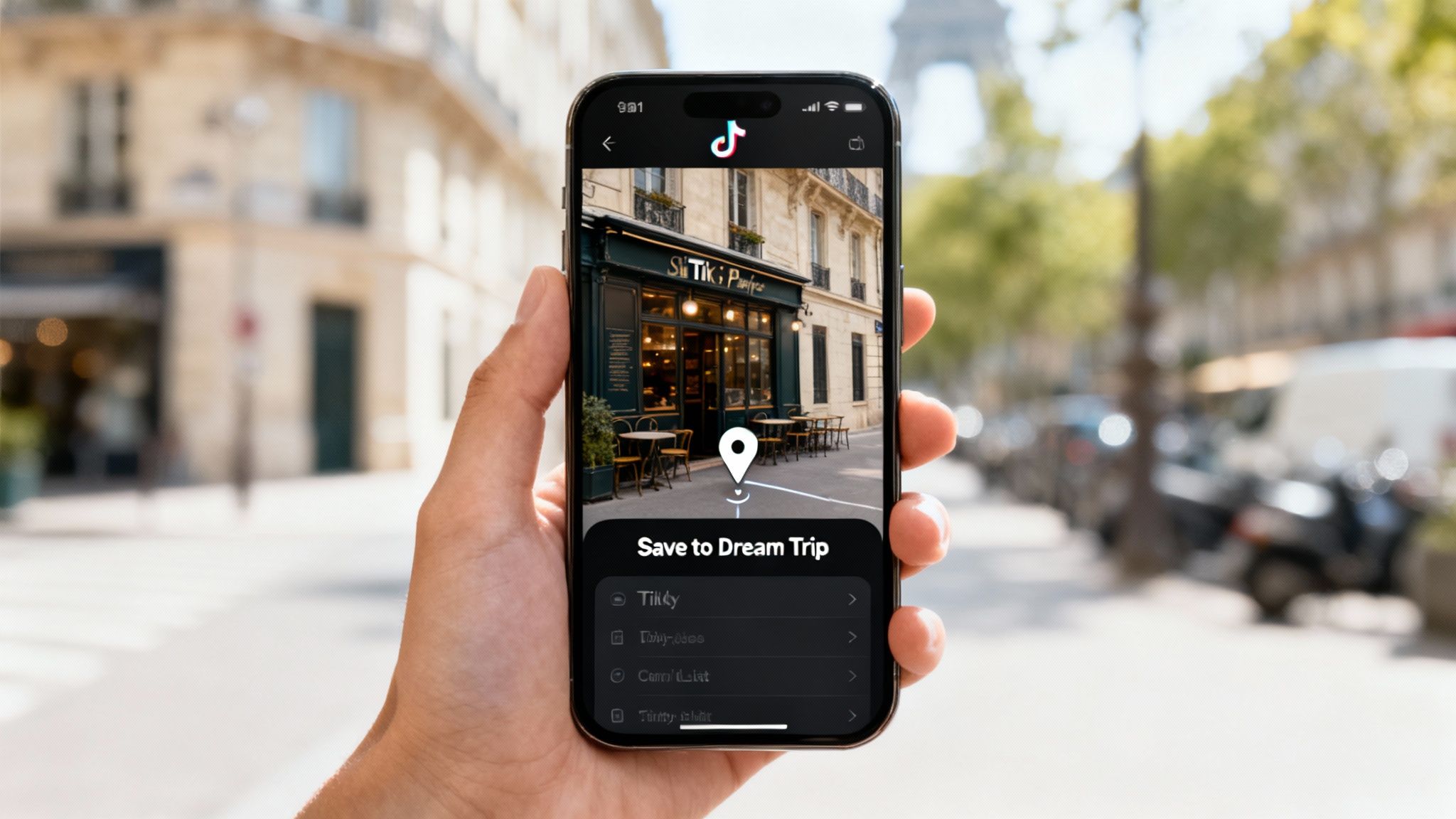
This single feature completely changes the game. It lets you:
- Capture Instantly: Save a spot with its exact location in one tap. No more manual searching and typing.
- Organize Visually: See every place you’ve saved pinned on a map, automatically sorted by city.
- Build Intuitively: Simply drag and drop your saved pins into a day-by-day schedule.
Modern itinerary planners are less about making lists and more about creating context. They help you see your trip on a map, making it so much easier to build a logical route that doesn't have you zigzagging across a city all day.
Why Your Old Planning Methods Don't Cut It
The biggest problem with spreadsheets and note-taking apps is that nothing is connected. You have a list of restaurants in one document, museum links in another, and your flight details buried in your email. A dedicated app to plan a travel itinerary pulls it all together, giving you a single, reliable hub for your entire trip.
This streamlined approach is what truly turns inspiration into reality. Of course, a great app is just one piece of the puzzle. Combining it with solid preparation is the key to a stress-free adventure. Getting insights from guides on preparing for an international journey can fill in the other crucial details.
And if you want to master the art of finding and organizing those hidden gems, check out our deep dive on how to https://www.thedreamtrip.app/blog/plan-trips-from-social-media-saves.
Comparing The Top Travel Itinerary Planner Apps
Picking the right travel planner is less about finding the one "best" app and more about finding the right fit for your trip. They aren't all built the same; each one has its own personality and strengths designed for different kinds of travelers. This breakdown compares the heavy hitters—Dream Trip, Wanderlog, TripIt, and Roadtrippers—to help you figure out which one actually deserves a spot on your home screen.
We're going to go beyond a simple checklist of features. I want to look at how these apps actually perform in the real world, focusing on the stuff that matters to modern travelers: grabbing inspiration from social media, building smart routes, working offline, and planning with a group. This is your guide to finding a tool that turns travel planning from a chore into a genuinely fun part of the trip.
Social Media and Discovery Integration
Let's be real—most trips these days start with a spark of inspiration from TikTok, a saved post on Instagram, or a random pin dropped on Google Maps. How an app captures that initial excitement is a huge deal.
Dream Trip: This app was literally built to solve the "I saved a hundred TikToks but can't find any of them" problem. Its killer feature is the ability to send a location straight from any social or map app into your trip plan using your phone's native share button. No screenshots, no manual typing. Dream Trip just grabs the location data and pins it for you. This makes it hands-down the best choice for travelers who build their trips visually from online discoveries.
Wanderlog: While Wanderlog doesn't have that direct share-to-app function, it has a really powerful web clipper for your browser and can import places directly from Google Maps. You can also forward booking confirmation emails, and it does a solid job of adding them to your plan. It takes a few more clicks than Dream Trip for social media saves, but it's a great organizer for things you find across the web.
TripIt: TripIt plays in a totally different league. Its superpower is automatically scanning your inbox for booking confirmations—flights, hotels, rental cars—and magically building a master itinerary. It’s brilliant for logistics, but it’s not designed for the discovery phase. You won't find features for saving random points of interest from social media.
Roadtrippers: As the name suggests, this is a specialist. Roadtrippers is all about finding interesting things along a driving route. You can discover and add quirky roadside attractions, scenic viewpoints, and cool businesses right inside the app, but it isn't meant for capturing ideas from external platforms like Instagram.
Key Insight: For travelers whose trips start on social media, Dream Trip offers the most fluid, frictionless workflow. Wanderlog is a strong runner-up for those who collect ideas from a wider range of websites and don't mind using a browser extension.
AI Scheduling and Route Optimization
Okay, you've saved all your bucket-list spots. Now what? The next headache is figuring out how to string them together into a logical plan. This is where AI scheduling and route optimization can save you hours of manual work in Google Maps.
Dream Trip: Has a smart AI scheduling tool that takes all your pins for a given day and automatically arranges them into the most efficient route. It even calculates walking or driving times between each spot, helping you avoid that frustrating backtracking across town. It's perfect for city breaks where you’re trying to squeeze a lot into a short amount of time.
Wanderlog: Also offers fantastic route optimization. You can see all your stops on a map and ask the app to reorder them into the best path. It clearly shows you the total travel time for the day, which helps you be realistic about what you can actually accomplish.
TripIt: This isn't what TripIt is for. It organizes your confirmed bookings chronologically and can give you directions from the airport to your hotel, but it won't help you plan an efficient sightseeing route between museums, restaurants, and photo spots.
Roadtrippers: Route optimization is the very soul of Roadtrippers. It’s purpose-built to create multi-day driving routes, letting you set limits for daily driving time and finding stops that fit perfectly. For a classic road trip, it’s the undisputed category king.
This kind of smart scheduling is becoming a must-have as the mobile travel app market continues to boom. Valued to hit $1 trillion in 2025, the market is projected to soar to $3.5 trillion by 2033. This growth is fueled by the fact that over 80% of travelers now use apps for everything from saving spots to generating optimized daily plans. It's clear people want the smart features found in these leading apps. You can find more details in this mobile travel app market analysis.
Offline Maps and Itinerary Access
Having access to your plans without an internet connection is absolutely non-negotiable. There's nothing worse than being stuck in a new city with no cell service and no idea where you're going next.
Dream Trip: Offers full offline access to your entire itinerary and maps with its premium plan. You can download everything—all your daily plans, notes, and pins—ensuring you can navigate and see your schedule even if you're totally off-grid.
Wanderlog: Pro users also get offline maps and itinerary access. It’s a critical feature that lets you download your trip data, making it a reliable tool for international travel or exploring remote areas.
TripIt: One of the key perks of TripIt Pro is offline access. All your flight details, hotel addresses, and confirmation numbers are saved to your device, so you're never scrambling for a Wi-Fi signal to find your booking info.
Roadtrippers: Offline maps are a premium feature here, too, and it's essential. Road trips almost always take you through dead zones with zero service. Being able to download your route and saved places is a lifesaver.
Collaboration and Group Planning
Planning a trip with friends or family adds a whole new layer of complexity. A good app should make it simple to share ideas, build a plan together, and keep everyone in the loop.
Dream Trip: You can invite your travel buddies to a trip plan where they can view the itinerary and, more importantly, add their own saved places to the shared map. This turns the map into a collaborative idea board, making it easy for everyone to dump their finds in one place before you start locking things in.
Wanderlog: This is where Wanderlog really shines. It allows multiple people to edit the itinerary in real-time, add suggestions, and leave comments on specific items. It even has a feature for tracking shared expenses, making it one of the most complete tools for coordinating a group trip.
TripIt: Lets you share your master itinerary, but it’s mostly a "view-only" experience. It’s perfect for keeping your family updated on your schedule but not great for actively planning a trip together.
Roadtrippers: Collaboration is a premium feature that lets you share your trip with co-planners who can add or remove stops. This works great for mapping out a drive with a partner or a couple of friends.
If you want to see how these fit into the broader landscape, check out our full guide to the best travel apps for planning any trip, which covers even more ground.
Feature Comparison Of Top Travel Itinerary Apps
To make things even clearer, here's a side-by-side breakdown of the key features. This table should help you quickly see which app aligns best with what you need for your next adventure.
| Feature | Dream Trip | Wanderlog | TripIt | Roadtrippers |
|---|---|---|---|---|
| Social Media Saves | ✅ Direct share from any app | ✅ Web clipper & map import | ❌ Not designed for this | ❌ In-app discovery only |
| AI Itinerary Builder | ✅ Creates optimized daily routes from your saved places | ✅ Optimizes daily routes | ❌ Organizes bookings only | ✅ Optimizes multi-day driving routes |
| Offline Maps & Access | ✅ Premium | ✅ Premium | ✅ Premium | ✅ Premium |
| Collaboration | ✅ Shared map & itinerary | ✅ Real-time editing, comments, expense tracking | ❌ View-only sharing | ✅ Premium co-planning |
| Best For | Social media-savvy explorers, visual planners, and city-breakers | Meticulous planners, group trips, and web-based researchers | Business travelers and anyone juggling complex logistical bookings | Road trippers, campers, and adventurers exploring by car |
| Pricing | Free & Premium Tiers | Free & Premium Tiers | Free & Premium Tiers | Free & Premium Tiers |
Ultimately, the best app to plan a travel itinerary comes down to you. If you're a visual traveler who starts planning on Instagram, Dream Trip's seamless workflow is tough to top. If you’re organizing a detailed group trip, Wanderlog’s deep collaboration tools are a godsend. For the frequent flyer living out of a suitcase, TripIt's automation is a lifesaver. And for the road warrior with a full tank of gas, Roadtrippers is the only co-pilot you need.
Choosing the Right App for Your Travel Style
There’s no single “best” app to plan a travel itinerary. The best app is the one that fits how you actually travel.
Instead of a one-size-fits-all list, let's find the right tool for your specific needs. Are you a spontaneous weekender whose trips are born from social media feeds? Or are you the meticulous organizer trying to herd cats for a big group trip? Each style has different pain points, and the right app makes planning feel less like a chore and more like the start of the adventure.
For the Social Media Inspired Weekender
Your camera roll is a graveyard of screenshots—hidden gems from TikTok, aesthetic cafes from Instagram Reels, and stunning viewpoints you swore you'd visit. Your biggest challenge isn't finding inspiration; it's organizing it all before it vanishes into the digital ether. You need a planning process that’s instant, visual, and mobile-first.
Top Recommendation: Dream Trip
Dream Trip was built for this exact workflow. Its killer feature is the one-tap share that sends any location directly from a social app to your trip map. No more fumbling with screenshots or manually typing in addresses. Just share it, and it's saved. This makes it the ultimate app to plan a travel itinerary for visually-driven explorers who discover on the fly.
We’ve all been there: scrolling late at night, you find the perfect Bali waterfall, save it… and then can never find it again. This problem is why the global travel app market is exploding, projected to grow from $134.4 billion in 2023 to $242.4 billion by 2030. With over 850 million users in 2023, the demand for better planning is crystal clear. You can find more data on travel app platform growth and the shift toward smarter tools.
For the Meticulous Group Organizer
You're the designated planner. The one who wrangles your friends or family. Your biggest headaches are managing clashing opinions, tracking shared documents, and keeping everyone's ideas—from restaurant picks to tour bookings—in one central spot.
Top Recommendation: Wanderlog
Wanderlog is a collaboration beast. It allows multiple people to edit the itinerary in real-time, add their own suggestions, and leave comments. Seeing everyone’s ideas populate a shared map and even tracking group expenses makes it a powerhouse for finally ending the chaos of group texts and endless email chains.
For group trips, success is measured in clarity and communication. An app that lets everyone see and contribute to the plan in real-time prevents misunderstandings and ensures all voices are heard, making the trip better for everyone involved.
This decision tree helps visualize which app is the right fit for your specific trip, whether you're a social planner, group coordinator, or road tripper.
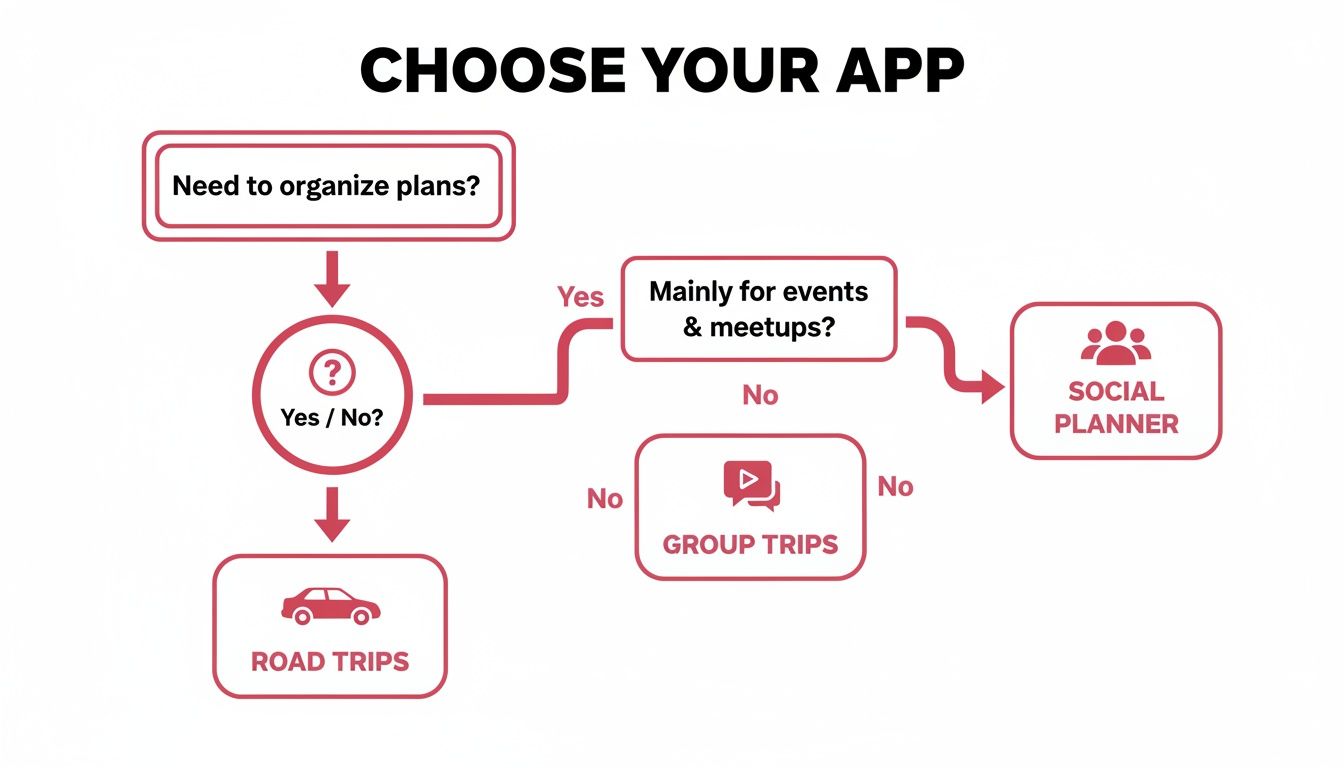
The key takeaway is that the most effective tool solves your biggest planning problem, whether that's capturing inspiration or coordinating logistics.
For the Efficient Business Traveler
Your trips are a tight schedule of meetings, flights, and hotel check-ins. You don't have time for discovery; you need pure, unadulterated organization. The goal is to have all your confirmations, addresses, and flight numbers in a clean, chronological timeline with zero manual entry.
Top Recommendation: TripIt
TripIt’s magic is its automation. You just forward your booking confirmation emails for flights, hotels, rental cars, and even dinner reservations, and it automatically builds a master itinerary. It’s the ultimate set-it-and-forget-it tool for staying organized on the move.
For the Adventurous Road Tripper
You live for the open road. Your perfect trip involves scenic backroads, quirky roadside attractions, and the freedom to go wherever the day takes you. You need a tool that's built for route planning, calculating driving times, and finding interesting stops along the way.
Top Recommendation: Roadtrippers
Roadtrippers was made for exactly this. It helps you plan multi-day driving routes, discover millions of points of interest (from national parks to wonderfully weird museums), and even set daily driving limits to keep the pace comfortable. Its sharp focus on life on four wheels makes it the best co-pilot for any journey.
It’s one thing to talk about features, but seeing an app in action is where the magic really happens. Let's walk through building a real itinerary for a weekend trip to Lisbon, turning a few scattered social media finds into a polished, day-by-day plan using Dream Trip.
This is how an app to plan a travel itinerary takes you from messy inspiration to a smart, actionable schedule in just a few minutes.
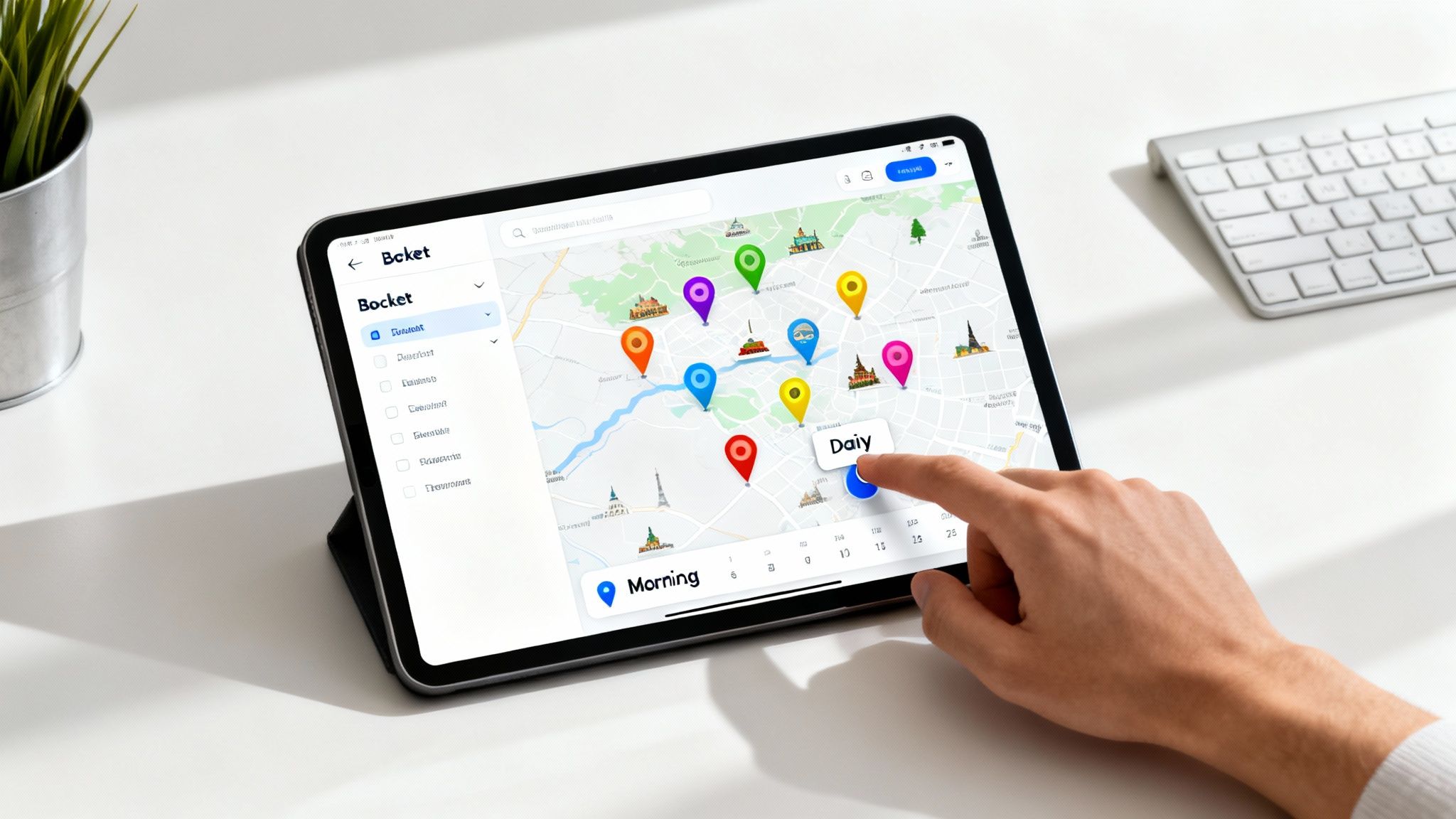
We'll go from saving ideas directly from Instagram and TikTok to organizing them on a map, building a daily schedule, and using AI to handle the tricky logistics.
Step 1: Capture Your Inspiration Without the Chaos
Planning starts the second you see something cool. Let’s say you’re scrolling Instagram and a video of Lisbon's iconic yellow Tram 28 pops up. The old way? A screenshot that gets buried in your camera roll, never to be seen again.
With Dream Trip, it’s instant and organized.
- Tap the Share Button: On that Instagram post, TikTok video, or even a Google Maps pin, just hit the native "Share" icon.
- Select Dream Trip: Choose "Dream Trip" from your list of apps.
- Add to Your Trip: A prompt appears. Just tap your "Lisbon Weekend" trip.
That's it. Dream Trip automatically grabs the location data and drops a pin on your Lisbon map. No more manual searching for "Tram 28 route" or fumbling to copy-paste an address. Repeat this for every cool spot you find—a famous pastel de nata bakery, a viewpoint from a blog, a restaurant a friend recommended.
Step 2: Visualize Your Bucket List
After saving a handful of places, open your "Lisbon Weekend" trip in the app. Instead of a boring text list, you’ll see a map of Lisbon covered in colorful pins for every location you saved.
This visual-first approach is a total game-changer. You immediately see clusters of activities and get a real feel for the city’s layout. Your ideas are no longer just abstract names in a note; they’re tangible points on a map, creating a visual bucket list that makes perfect sense.
An itinerary map does more than show you where things are; it shows you how they relate to each other. This spatial context is the foundation for building a smart, efficient plan that minimizes travel time and maximizes your experience.
This visual layout also helps you spot outliers right away. For example, you might notice that one cafe you saved is miles from everything else, forcing a quick decision: is it worth a special trip, or should you save it for another time?
Step 3: Drag and Drop to Build Your Days
Now for the fun part—actually building your itinerary. With your map of pins right in front of you, you can literally start dragging and dropping them into a daily schedule.
- Day 1: Notice the Belém Tower and Jerónimos Monastery are right next to each other? Drag both pins into your "Day 1" schedule. That famous bakery you saved is in the same neighborhood, so pull that one in, too.
- Day 2: See that tight cluster of pins in the Alfama district? Drag them all into "Day 2" to create a natural walking tour of the historic quarter.
This tactile, drag-and-drop interface makes scheduling feel intuitive and almost like a game. You’re not just typing into a spreadsheet; you’re visually piecing your days together based on geography, which naturally leads to a more logical flow.
Step 4: Optimize with AI for a Smarter Schedule
Okay, you've got a rough plan for each day. Now it’s time to let the AI do the heavy lifting. Let's say for Day 2 in Alfama, you’ve dropped five spots you want to visit. Instead of just guessing the best route, tap the "Optimize Route" button.
Instantly, the AI will:
- Reorder Your Stops: It arranges your five locations into the most efficient sequence to eliminate backtracking.
- Calculate Travel Times: The plan now includes estimated walking times between each stop, so you know exactly how long it will take to get around.
- Suggest Visit Durations: The AI also adds suggested visit times for each spot based on typical tourist patterns, giving you a realistic timeline for the day.
This one tap transforms a simple list of places into a genuinely practical plan. It answers the crucial question every traveler has: "How much can we realistically fit into one day?" To see more, check out Dream Trip's powerful AI itinerary generator and how it creates these smart schedules.
Step 5: Fine-Tune with the AI Assistant and Budget Tools
Your itinerary is looking solid, but there are always last-minute questions and details. Instead of jumping back to your browser, use Dream Trip's built-in tools.
Ask the AI Travel Assistant: You can ask specific questions about the places you've already saved. For instance:
- "What are the opening hours for Jerónimos Monastery on a Tuesday? I want to avoid peak crowds."
- "Is there a good place for lunch near the Belém Tower that I saved? Looking for something under €15."
- "What's the best way to get to the Alfama district from my hotel? Is the metro cheaper than a taxi?"
The assistant provides instant, context-aware answers, saving you from toggling between a dozen different apps and websites.
Manage Your Budget: Finally, open the integrated Trip Cost Calculator. Plug in estimated costs for flights (€300), hotels (€450 for 3 nights), and a daily budget for food and activities (€75/day). The app keeps a running total, helping you stay on track so your dream trip doesn't come with any nasty financial surprises.
Using Your Itinerary App While Traveling

A perfectly planned trip is useless if you can't access it when you actually need it. Once your plane touches down, your app to plan a travel itinerary stops being a planning tool and becomes your on-the-ground co-pilot. Its real magic kicks in when you're navigating a new city, far from any reliable Wi-Fi.
This is where the in-travel features make all the difference, and the most critical one by far is offline access to your maps and schedule.
Navigating Without a Connection
Let's be real—losing your data connection is a traveler's rite of passage. It happens when you're deep in an underground metro, hiking through a national park, or just trying to be smart with your data. An app with solid offline functionality means you're never actually lost.
Premium versions of apps like Dream Trip and Wanderlog let you download your entire trip, including every single pinned location on your map. This means you can get walking directions to that hidden cafe or double-check your next reservation time without needing a single bar of service. And while you’re out exploring, learning how to avoid roaming charges can be a real budget-saver on international trips.
Having offline maps isn't just a convenience; it's a lifeline. It gives you the confidence to wander off the main path, knowing you can always find your way back to your hotel or your next stop, connection or not.
Real-Time Collaboration and Organization on the Go
Traveling with other people adds another layer of complexity. A great travel app smooths this out with real-time collaboration, letting everyone interact with the plan as the day actually happens.
Think about it:
- Your friend discovers a cool market nearby and just adds it to the shared map. Instantly, everyone sees it.
- You finish up at the museum and check it off the list, so your partner knows you're ready to meet up for lunch.
- Someone adds a quick note to a restaurant pin, like, “The locals swear by the fish tacos here.”
This keeps everyone on the same page without a chaotic group chat.
Finally, the app acts as the single source of truth for all your documents. Having every ticket, booking confirmation, and address in one place means no more frantic, last-minute digging through your email for a QR code. It’s the ultimate organizational tool that makes the actual travel part of your trip feel effortless.
Still Have Questions About Travel Planners?
Picking the right app to plan your next adventure usually brings up a few questions. From figuring out costs to wondering if you can really trust AI with your dream vacation, getting straight answers makes all the difference. Here are a few things travelers often ask.
What Is the Best Free App to Plan a Travel Itinerary?
This is the big one. Luckily, a lot of the top apps have seriously good free versions, so you can start planning without dropping any cash. The "best" one just comes down to what you need most.
If you’re the kind of person who builds trips from cool spots you find on social media, Dream Trip’s free tier is fantastic for saving all that inspiration and piecing together a basic plan. If you’re planning with a partner, Wanderlog also offers solid free tools for collaborating. And for someone who just wants to auto-organize flight and hotel confirmations from their email, TripIt’s free version is a classic for a reason.
Can AI Really Plan a Better Itinerary Than I Can?
Think of AI as a super-smart assistant, not a replacement for your own travel instincts. Its real magic is handling the tedious stuff that humans are bad at—like figuring out the absolute most efficient route between all your saved spots so you’re not backtracking across a city all day.
For example, an app to plan a travel itinerary like Dream Trip takes your list of must-see places and crunches the numbers. It calculates walking and driving times, factors in how long people usually spend at each spot, and then suggests a daily sequence that just makes sense. It handles the complex logistics, saving you hours of frustrating map-checking and letting you focus on the fun parts.
AI doesn't know you want to linger for an extra hour at that little art museum, but it makes sure you don't waste an hour in traffic getting there. It perfects the how so you can focus on the what and why.
How Do I Get My Travel Partner to Use a Planning App?
The key here is to show, not tell. Nobody wants another piece of "homework."
Start by sharing a read-only link to the trip you’ve started. Let them see how clean and visual it is. It’s hard to argue with a beautiful map that has all your restaurant ideas pinned in one place. Point out a feature they’ll actually love.
Most modern planners have really intuitive collaboration features where they can just tap to add their own ideas or drop a comment. Once they realize it’s way easier than a chaotic spreadsheet or an endless email chain, they’ll be on board.
Ready to finally turn all that travel inspiration into a real, actionable plan? Dream Trip is the AI-powered app that makes it happen. Start building your next adventure for free by visiting https://www.thedreamtrip.app.


